
Advantages of PNG extend far beyond simple transparency support. Since its introduction in 1995 as a free, patent-free alternative to the restricted GIF format, PNG has evolved into the dominant image format for web design, graphic design, and digital content creation worldwide. Understanding Advantages of PNG is essential for anyone working with images professionally or creating content for the internet. In this comprehensive guide, we’ll explore why PNG has become the industry standard and how its unique features can elevate your digital projects.
The Advantages of PNG stem from a fundamental design philosophy: create a format that improves upon GIF in virtually every way while remaining free from patent restrictions. This commitment to excellence has made Advantages of PNG the default choice for millions of designers, developers, and content creators globally.
The cornerstone of Advantages of PNG is its lossless compression technology. Unlike JPEG, which uses lossy compression and discards data with each save cycle, PNG preserves every single pixel of your original image data without degradation. This means you can open, edit, and resave PNG files unlimited times without any loss of quality—a critical advantage for professional designers working on iterative projects.
Advantages of PNG with lossless compression ensure that your images remain perfectly sharp and clear, regardless of how many times you modify them. When you save a JPEG file multiple times, you experience cumulative quality loss called “generation loss.” PNG completely eliminates this problem. For designers working on logos, icons, and graphics that require multiple revisions, Advantages of PNG make it the only rational choice.
PNG utilizes the DEFLATE compression algorithm, which combines LZ77 compression with Huffman coding—the same proven technology found in ZIP files. This sophisticated approach allows PNG to achieve compression ratios 10-50% better than GIF files containing similar content, all while maintaining perfect image fidelity. The Advantages of PNG compression method has been battle-tested across decades and is recognized as one of the most reliable, non-patented compression techniques available.
Revolutionary Transparency and Alpha Channel Support
One of the most celebrated Advantage of PNG is its sophisticated transparency system through the alpha channel. Unlike GIF’s binary transparency (where pixels are either completely transparent or completely opaque), PNG’s 8-bit alpha channel provides 256 different levels of transparency. This enables gradient transitions, semi-transparent effects, and soft edges that were impossible with previous formats.
The Advantages of PNG transparency capabilities make it perfect for creating images that work seamlessly on any background. A logo saved as PNG with a transparent background can be placed on backgrounds of any color, pattern, or texture without visible white boxes or background artifacts. This flexibility is why Advantages of PNG are so valuable for brand identity assets, UI elements, and professional design work.
With the alpha channel, each pixel can have its own opacity level ranging from 0 (fully transparent) to 255 (fully opaque). This enables the creation of watermarks, shadow effects, fade-in overlays, and other sophisticated visual effects impossible with formats lacking this capability. The Advantages of PNG alpha transparency are particularly valuable for web designers creating layered compositions and complex visual effects.
Advantages of PNG: Superior Color Depth and Support

Advantage of PNG include exceptional color depth capabilities. PNG supports indexed-color images using palettes with up to 256 colors (PNG-8), full RGB color support with millions of colors (PNG-24), and full RGBA color with an alpha channel supporting 16.7 million colors plus transparency (PNG-32). For professional work, PNG can even support up to 48-bit truecolor (16 bits per channel), providing the highest color fidelity.
This flexibility means Advantages of PNG extend to any type of image content. Whether you’re working with simple line art using limited colors or complex illustrations with subtle color gradations, PNG can handle it optimally. The Advantages of PNG color support makes it suitable for a vast range of digital graphics, from simple icons to detailed illustrations.
Compared to GIF’s strict 256-color limitation, the Advantages of PNG in color depth are transformative. PNG-24 and PNG-32 files can display over 16 million colors with perfect accuracy, making them suitable for any graphic design work requiring color precision.
Advantage of PNG: Gamma Correction for Cross-Platform Color Accuracy
Advantages of PNG include built-in gamma correction capabilities that ensure colors appear consistent across different display devices and operating systems. Gamma correction allows precise control over color brightness and contrast levels, addressing a critical challenge in digital imaging: different monitors and devices interpret color data differently.
The gamma correction feature within Advantages of PNG enables designers to embed display gamma information directly into image files. This means your carefully calibrated colors will appear consistent whether the image is viewed on a Mac, Windows PC, or Linux system. The Advantages of PNG gamma correction prevents the color shifts and brightness variations that plague images shared across platforms.
This technical advantage of PNG is particularly valuable for brand design work, where color consistency is essential for maintaining brand identity. The Advantages of PNG ensure that a brand’s signature blue appears identical on every device where the logo is displayed.
Advantage of PNG: Patent-Free and Royalty-Free Legal Protection
A major advantage often overlooked is that Advantages of PNG include complete freedom from patent restrictions and royalty payments. PNG was specifically created as a replacement for GIF after Unisys Corporation announced patent licensing fees for the GIF format’s LZW compression algorithm. This legal freedom means Advantages of PNG allow everyone to use, modify, and distribute PNG images without worrying about patent infringement.
The Advantages of PNG patent-free status has been maintained throughout its history. Any developer, company, or individual can use PNG without licensing fees or legal complications. This democratization of image technology is one of the fundamental Advantages of PNG that contributed to its widespread adoption.
Advantage of PNG: Perfect for Specific Content Types
Advantages of PNG make it the universal standard for screenshots. When you capture a user interface, buttons, menu items, and color transitions must remain perfectly sharp and detailed. PNG’s lossless compression preserves pixel-perfect detail that JPEG would blur or distort. The Advantages of PNG for screenshots mean that tutorials, technical documentation, and user guides can display interface elements with absolute clarity.
Advantage of PNG for Logos and Branding
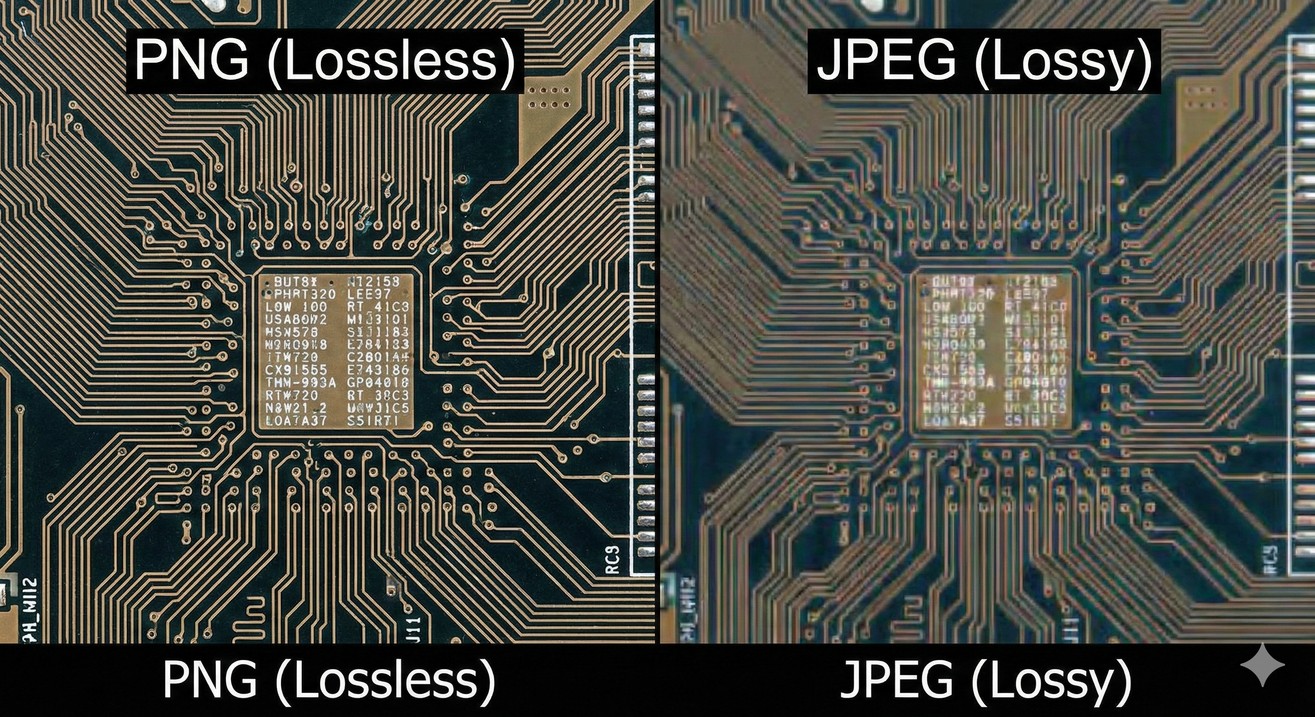
The Advantages of PNG are perhaps most valuable for logo design and branding. A logo needs to maintain perfect quality at any size and work on any background. Advantages of PNG transparency allows logos to be placed on colored backgrounds, textured backgrounds, or even photographic backgrounds without visible white boxes. The lossless compression ensures logos remain sharp, making Advantages of PNG essential for professional brand identity systems.
Advantage of PNG for Icons and UI Elements
Web and application designers favor PNG because Advantages of PNG include the ability to maintain pixel-perfect clarity and sharp edges—essential for icon readability at various sizes. Whether you’re creating a 16-pixel favicon or a 256-pixel application icon, the Advantages of PNG ensure consistent quality and crispness across all sizes.
Advantage of PNG for Diagrams, Charts, and Illustrations
Technical diagrams, flowcharts, architectural plans, and data visualizations benefit enormously from PNG’s format. The Advantages of PNG for these content types stem from perfect rendering of sharp lines and flat colors. PNG compression handles these graphical elements extremely efficiently, and the Advantages of PNG ensure crystal-clear rendering of text and line art.
Advantage of PNG for Graphics Requiring Repeated Editing
For designers working on graphics that require multiple iterations and revisions, Advantages of PNG provide peace of mind. With lossless compression, every save maintains perfect quality. The Advantages of PNG mean you can open and resave files repeatedly during the design process without quality degradation.
Advantage of PNG: Interlacing for Progressive Image Display
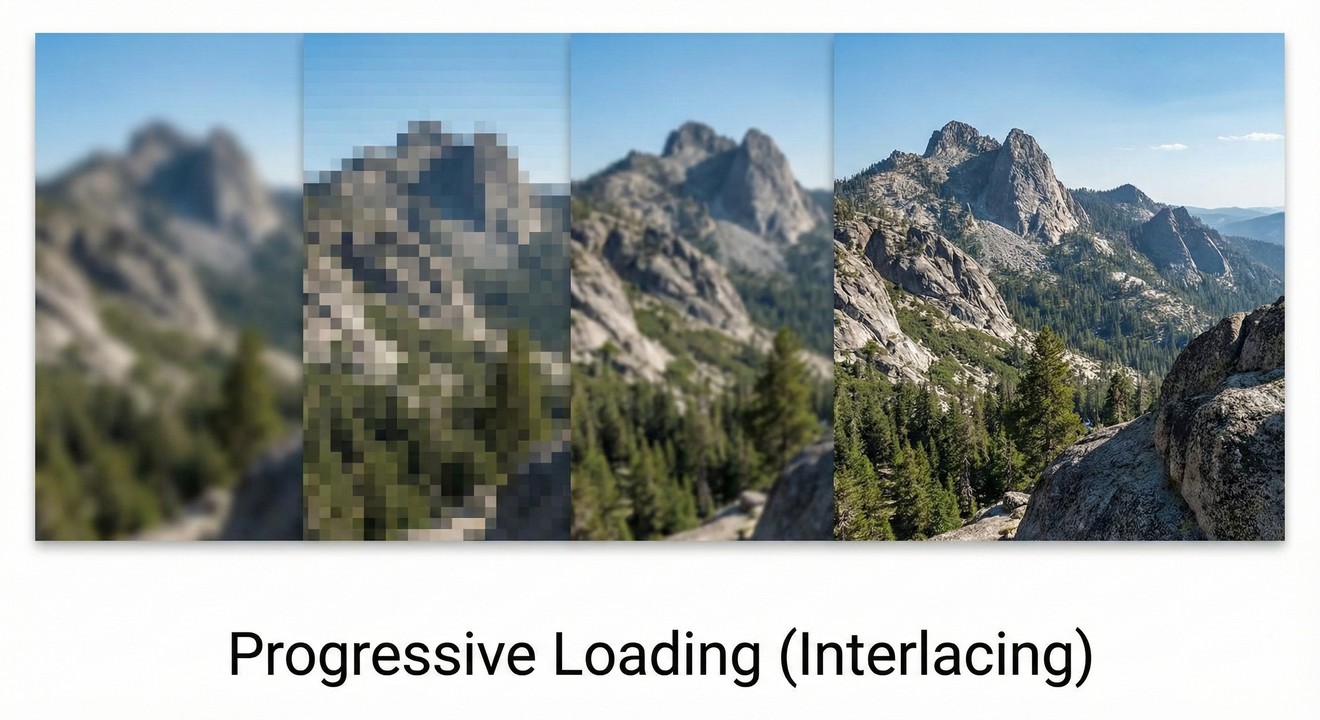
Advantage of PNG include support for Adam7 interlacing, a sophisticated two-dimensional interlacing scheme that enables progressive image rendering. When PNG interlacing is enabled, a rough preview of the image appears almost immediately while full resolution builds progressively as more data arrives. This feature delivers meaningful visual feedback during image loading, particularly valuable for users on slower connections.
The Advantage of PNG interlacing work through seven progressive passes, with each pass adding more detail. Pass one shows just 1.5625% of pixels in a very rough preview, while pass seven finally displays the complete image at full resolution. The Advantage of PNG interlacing create an appealing “fade-in” effect that improves perceived performance and user experience.
However, Advantages of PNG interlacing comes with a trade-off: interlaced PNG files are approximately 20% larger than non-interlaced versions. Whether the improved progressive rendering justifies the file size increase depends on your specific use case and target audience connection speeds.
Advantages of PNG vs. JPEG
The fundamental difference between PNG and JPEG makes each superior for different purposes. Advantage of PNG over JPEG include:
Lossless compression preserving perfect quality through multiple save cycles
Transparency support (JPEG cannot be transparent)
Perfect preservation of sharp edges and text (JPEG blurs these)
Better compression for graphics with solid colors and sharp transitions
However, JPEG maintains advantages for photographs with smooth color gradations, where JPEG achieves much smaller file sizes. Advantages of PNG are optimal for graphics; JPEG remains superior for photos.
Advantage of PNG vs. GIF
Advantage of PNG decisively surpass GIF in nearly every dimension:
Support for millions of colors (PNG-24/32) versus GIF’s 256-color limitation
Sophisticated alpha transparency versus GIF’s binary on/off transparency
Compression efficiency: PNG achieves 5-25% better compression than GIF
No patent restrictions (GIF was legally restricted until 2000)
The only advantage GIF maintained was native animation support, but APNG (Animated PNG) has now addressed this limitation, making Advantages of PNG superior across all dimensions.
Advantage of PNG vs. WebP
WebP offers superior compression (typically 26% smaller than PNG) and broader capabilities, but Advantages of PNG include:
Broader browser compatibility, especially with legacy browsers
More mature ecosystem and tool support
Better compatibility with design software
Proven reliability over nearly three decades
Advantage of PNG make it the safer choice for universal compatibility, while WebP represents the future for new projects prioritizing performance.
Advantage of PNG: Optimization Without Compromise
An often-overlooked advantage of PNG is that you can optimize PNG files substantially without sacrificing quality. Advantages of PNG optimization include:
Color Reduction: Converting PNG-24 to PNG-8 when fewer colors are needed (50-70% file size reduction)
Metadata Removal: Stripping unnecessary EXIF data, creation dates, and color profiles (5-15% reduction)
Intelligent Compression: Tools like TinyPNG use smart algorithms to reduce files by 10-30% while maintaining visual quality
Proper Sizing: Ensuring PNG dimensions match display requirements
Quantization: Intelligently reducing color palettes while preserving visual quality
The Advantage of PNG extend to optimization flexibility: you can reduce file sizes dramatically while maintaining lossless quality through careful optimization.
Conclusion: Why Advantages of PNG Make It Essential
Advantages of PNG make it the default choice for countless digital professionals worldwide. From lossless compression that preserves perfect quality through unlimited save cycles, to sophisticated transparency enabling creative visual effects, to patent-free legal status, the Advantages of PNG are comprehensive and compelling.
Whether you’re designing logos and icons, capturing screenshots for documentation, creating detailed illustrations, or building web graphics, Advantages of PNG provide the optimal combination of quality, flexibility, and compatibility. The Advantages of PNG have made it the standard format for 81.8% of websites and the preferred format for millions of designers globally.
By understanding and leveraging the Advantages of PNG, you’ll create superior digital assets that maintain perfect quality, display consistently across all devices and platforms, and integrate seamlessly into any creative project. The Advantages of PNG continue to make it the most versatile and reliable image format for modern digital design, and its prominence will endure for decades to come.
The Advantages of PNG represent a remarkable achievement in digital imaging: a format that is simultaneously more powerful, more flexible, and completely free from legal restrictions compared to the formats it replaced. For any digital professional, understanding and utilizing Advantages of PNG is fundamental to creating high-quality digital content.
What makes PNG's lossless compression such a significant advantage over JPEG's lossy compression?
PNG uses lossless compression, so every time you edit and save, the image stays perfectly sharp with no quality loss, unlike JPEG which degrades over multiple saves. This makes PNG ideal for logos, icons, UI elements, and any graphic that needs repeated editing or pixel-perfect clarity.
How is PNG transparency better than GIF transparency?
GIF only supports on/off transparency, so edges around transparent areas often look jagged. PNG supports an alpha channel with 256 transparency levels, giving smooth edges, soft shadows, and gradient fades that blend cleanly on any background.
Why does PNG’s patent‑free status matter?
PNG was designed as a royalty‑free, patent‑free format, so anyone can use it in software, websites, and products with no licensing fees or legal risk. This has helped PNG become widely adopted in browsers, design tools, and open‑source projects.
Why is PNG the best choice for logos and icons?
For logos and icons, PNG combines sharp detail, lossless quality, and true transparency, so assets look clean at any size and on any background. It’s fully supported by major design tools and browsers, making it the safest default for brand assets and UI graphics.
Need to Compress or Convert Files?
Try CompressNow.in - Free, Fast & Secure file compression and conversion tools!

Author Bio – Tanishk Singh
Tanishk Singh is a Digital Marketing Strategist, SEO Specialist, and Web Technology Expert with over 4+ years of hands-on experience in building, ranking, and monetizing high-performance web platforms.
He has helped scale organic traffic for multiple education and SaaS websites, including increasing Shoolini Online’s SEO traffic from 800 to 20,000+ users in just 2.5 months using advanced content architecture, AI-driven SEO, and Google SGE optimization.
Tanishk specializes in creating AI-powered web tools, performance-optimized platforms, and SEO-focused websites that rank, convert, and generate consistent revenue.